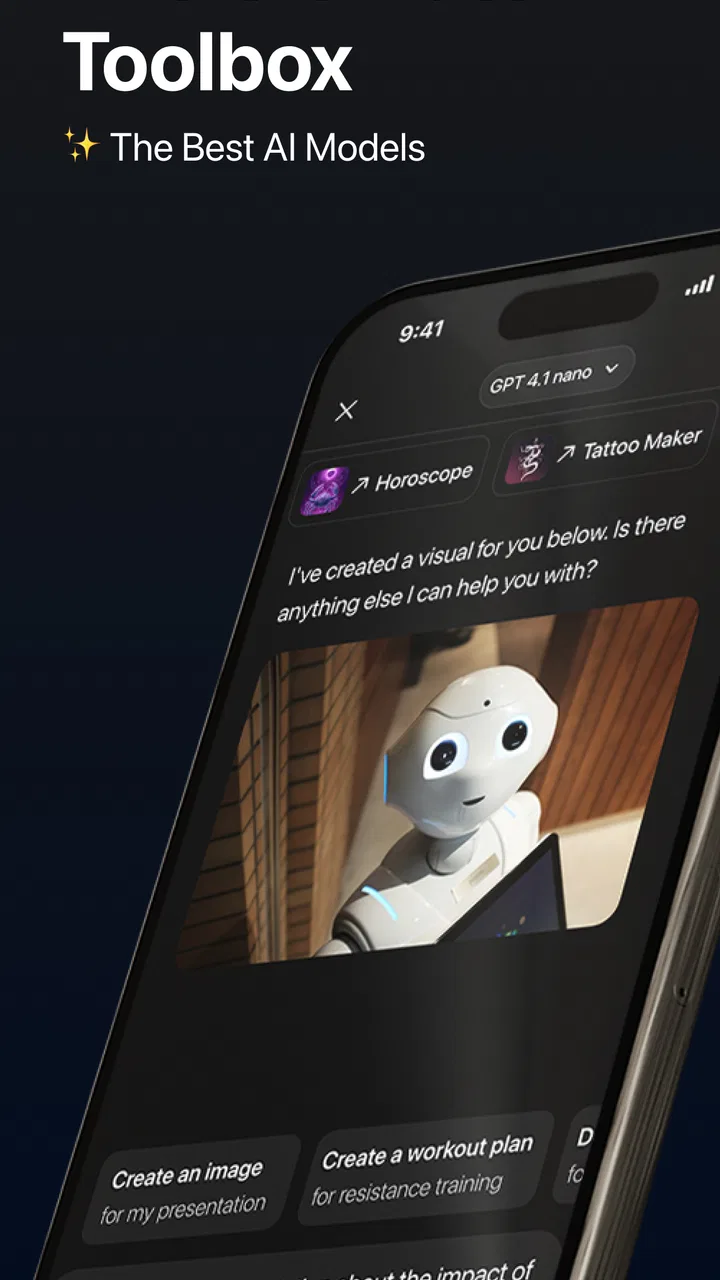
Chat & Ask Anything - Ocean AI
- 4.6
- Rating
- 1.00M
- Installs
- Free
- Price

 Analysis by App-foxy
I approached Chat & Ask Anything - Ocean AI as a practical productivity assistant rather than a novelty chatbot. The first thing to understand is its role: it gives you a conversational way to ask questions, develop ideas, rewrite text, and work through everyday tasks with help from GPT-4 and GPT-4o API technology. That makes it most useful when you know the result you want but do not yet have the wording, structure, or starting point.
The app is free to install, which makes it easy to test without committing immediately. Its optional in-app purchases range from $4.99 to $49.99 per item, so I would still check the purchase screen carefully before choosing anything beyond the free experience. Ocean AI comes from Dijital Elma and sits in the productivity category, although the experience feels closer to a general-purpose writing and thinking companion than to a traditional task manager.
After spending time with it, my main impression is that the quality of your request matters more than the length of the request. A vague question can produce a broad answer that needs work. A short but well-framed instruction can give you something immediately useful. The best way to use Ocean AI is as a collaborator that needs direction, not as an automatic replacement for your own judgement.
You May Also Like

 Blood Strike: 2.5 Anniversary
Blood Strike’s Loadouts Turn Every Drop Into a Tactical Gamble
A close look at Blood Strike’s custom loadouts: how fast access to signature weapons reshapes its battle royale rhythm, rewards preparation, and narrows the gap between fights.

 Pandora - Music & Podcasts
Pandora’s Music Is Easy to Start, but Harder to Recover
Pandora’s strength is its low-effort path from a seed to a station. Its weak spot is how much confidence it asks you to place in connection, setup, and quiet recovery.

 8 Ball Pool
 Is Built on Rivalries, Rematches, and Routine
A close look at the rivalries, rematches, shared routines, and unanswered safety questions that turn a quick pool match into a persistent mobile community.

 Samsung Music
’s Quiet Strength Is Playing What You Already Own
Its reach comes less from spectacle than from dependable access to a personal library. That simplicity is both the app’s strongest retention engine and its ceiling.

 AccuWeather: Weather Radar
AccuWeather Review: A Quick, Clear Forecast for Everyday Decisions
For everyday plans, the best forecast is the one you can understand quickly. AccuWeather makes rain timing, radar, and local conditions easy to act on, with a few trade-offs.

 Hill Climb Racing
Why Hill Climb Racing Still Turns Crashes Into One More Run
A tiny car, a bumpy hill and one more upgrade: Hill Climb Racing keeps resurfacing because its simple chaos makes every near-miss feel personal.
More From Our News Desk



What to expect when you open Ocean AI
The store summary presents the app as a place for smart, natural conversations, and that is the right expectation. You can write in ordinary language instead of learning a special command system. If you need a polite message, a study explanation, a list of ideas, or a clearer version of something you wrote, you can ask directly and then continue the conversation when the first response is not quite right.
That conversational design is important because a useful answer often takes more than one attempt. For example, “Help me plan my week” is a reasonable starting point, but it leaves out your available time, priorities, and deadlines. After the first reply, you can add those details and ask Ocean AI to make the plan more realistic. I found this back-and-forth more natural than repeatedly opening separate tools for brainstorming, editing, and summarizing.
At the same time, I would not treat every response as finished work. The app can help you get past a blank page, but it may still misunderstand an important detail or offer advice that needs checking. This matters especially for health, legal, financial, academic, or workplace decisions. Ocean AI is valuable for organizing information and improving a draft; it should not be your only authority when the consequences of an error are serious.
The app has a Teen content rating, so it is not presented as a children’s tool. That is a useful reminder for families: a conversational AI can discuss many subjects, and younger users may need guidance about what to share and how to evaluate answers. I would avoid entering passwords, private identification details, confidential work material, or anything that you would not want copied into a digital conversation.
Who will get the most from it
I think Ocean AI is a strong fit for students who need a concept explained in simpler language, job seekers polishing application text, freelancers turning rough notes into a client-ready outline, and busy users who want help composing everyday messages. It is also handy for people who think more clearly by talking through a problem than by staring at an empty document.
It is less suitable for someone looking for a dedicated calendar, a reliable reminder system, a document archive, or a specialist research database. A conventional notes app is better when your priority is long-term organization. A search engine is often better when you need current web pages, original sources, or direct links to verify a claim. Ocean AI can help you decide what to search for, but conversational fluency should not be confused with live, source-based research.
Getting through the first setup without overthinking it
Ocean AI is available as a free app for devices running Android 7.0 or later. The current version is 6.7, and the app was released on January 7, 2025. Those details make it accessible to people using older Android hardware, although the quality of your experience will still depend on your device, connection, and the way you phrase requests.
Once you reach the chat area, I recommend resisting the urge to test it with a random question. Instead, decide on one small task that has a clear finish line. “Write a short message asking my landlord to confirm a repair appointment” is a better first test than “Tell me everything you can do.” A concrete request lets you judge the response quickly and gives you something useful even if you never explore the rest of the app.
Before using the service regularly, take a moment to notice how the app presents any premium options. The free entry point is convenient, but optional purchases can add up depending on what you select. I would not approve a purchase simply because a response is taking longer or because a prompt suggests an upgrade. First decide whether the free experience already solves your problem, then consider whether additional access is genuinely worth it for your routine.
A simple setup habit also improves privacy. I write placeholders such as “[client name]” or “[appointment date]” while drafting a message, then replace them myself afterward. This preserves the useful structure without sending unnecessary personal information into the conversation. The same approach works for work documents: remove names, account numbers, internal project labels, and other details before asking for a rewrite.
The quickest route to a meaningful first result
For a first successful action, I suggest using Ocean AI as an editor. Paste a short paragraph and ask it to make the wording clearer while keeping the original meaning and tone. This is a good test because you can compare the result with your own text instead of trying to judge an answer about an unfamiliar subject.
When the response is close but not right, give one correction at a time. You might say, “Keep it friendly, remove the apology, and limit it to three sentences.” Specific follow-up instructions usually work better than starting over with a completely new conversation. This is one of the app’s practical strengths: the dialogue gives you a place to refine the result instead of forcing you to formulate the perfect request at the beginning.
Another useful first workflow is turning scattered notes into a structure. I might enter a few rough points from a meeting and ask for a list of decisions, open questions, and next actions. I would then check every item against the original notes, because the assistant can make an implied idea sound like an agreed decision. Used carefully, this saves time while keeping the final responsibility with me.
For studying, I prefer asking for an explanation at a specific level rather than requesting an answer alone. “Explain this as if I understand the basics but keep confusing these two terms” creates a more helpful learning exchange. You can then ask for a short quiz or a new example, but I would use the result as practice material and verify important facts with your course resources.
Three smarter habits that are easy to miss
First, separate the task from the background. Start with the action you want, then add the context needed to do it well. For example, ask for a concise email, identify the recipient, explain the situation, and state the tone. This prevents the important instruction from getting buried inside a long personal story.
Second, ask for alternatives when tone matters. Instead of accepting the first draft, request a direct version, a warmer version, and a more formal version. Comparing them helps you notice what you actually want, and it is often faster than trying to describe the perfect tone in abstract terms. I find this especially useful for messages where “polite” could mean friendly, cautious, firm, or apologetic.
Third, make the app show its assumptions. If Ocean AI creates a plan, ask it to list what it assumed about your time, priorities, or constraints. This exposes hidden gaps before you follow the plan. It is a small change, but it turns a polished-looking answer into something you can inspect and correct.
Where first-time users may get confused
The most common misunderstanding is expecting a single prompt to produce a perfect final answer. Conversational AI often gives you a plausible first draft, not a guaranteed final one. If the response is too general, the solution is usually to add a constraint: audience, length, format, reading level, deadline, or examples of what you dislike.
Another point of friction is that a confident answer may still be wrong. Ocean AI’s natural conversational style can make uncertain information sound settled. I would verify names, dates, quotations, calculations, and technical instructions before relying on them. For current events or changing product details, I would use a source that clearly shows where its information comes from rather than depending on a chat response alone.
Users may also expect the app to remember every preference permanently. I would not build an important workflow around that assumption. Keep the instructions that matter in your own notes and include them again when a task requires consistency. For repeated work, a small personal template is more dependable than hoping the assistant will infer your preferred style from an earlier exchange.
Long conversations can become difficult to manage as well. If the discussion moves from brainstorming to editing to final formatting, start a fresh chat when the purpose changes and bring over only the relevant summary. That keeps the new request focused and makes it easier to identify which details Ocean AI should use. It also reduces the chance that an old instruction will accidentally affect a new answer.
There is a practical trade-off between convenience and control. Ocean AI is faster than manually drafting every sentence, but a traditional notes app gives you clearer ownership of files and organization. A keyboard-based writing tool may be better if you only want spelling and grammar corrections. A search-oriented service may be better when citations and source discovery are central. I would choose Ocean AI when conversation and flexible drafting are the main needs, not simply because it is available.
An everyday example that shows its real value
Imagine that I have a busy afternoon: I need to reply to a customer, prepare a short project update, and understand a confusing instruction from a colleague. I would handle these as separate conversations rather than mixing them together. In the first, I would ask for a courteous reply with a clear next step. In the second, I would provide bullet points and request a concise update. In the third, I would paste the instruction and ask Ocean AI to explain it in plain language, followed by a list of questions I should clarify.
The important part is what happens afterward. I would compare the customer reply with the actual agreement, check that the project update contains only confirmed information, and send the colleague’s questions myself. The app reduces the effort of drafting and organizing, but I remain the person deciding what is accurate and appropriate. That division of work is where the tool feels most dependable.
If you use it for workplace writing, I recommend treating the generated text as a starting draft rather than copying it without review. AI-written messages can sound smooth while missing a subtle relationship or responsibility. Add the details only you know, remove exaggerated language, and read the result aloud once. That final pass often reveals wording that is technically correct but unlike the way you normally speak.
My next-step recommendation
Ocean AI has earned a solid reputation on the store, with an average rating of 4.6 from around 37 thousand ratings, and it has passed the one-million-install mark. Those figures suggest that many people find the basic idea useful, but they do not remove the need to decide whether its conversational approach matches your habits. I would judge it by one repeatable task rather than by the size of its audience.
My suggested trial is simple: use the free version for a few days with three tasks you genuinely perform, such as rewriting a message, organizing notes, and explaining a difficult topic. Keep a quick mental record of whether the answers save time after checking them. If you repeatedly need to correct invented details, prefer direct sources, or want a structured archive, another productivity tool may serve you better.
For me, the strongest reason to keep Ocean AI installed is its ability to turn an unclear intention into a workable first draft. It is particularly good at helping me begin, compare wording, and break a complicated request into smaller steps. Its weakest point is the temptation to trust an articulate answer too quickly. The more important the task, the more carefully I review the result.
My recommendation is to try Ocean AI if you want a flexible AI conversation partner for writing, planning, learning, and idea development. Start with a small, checkable task, protect private information, and give precise follow-up instructions. Skip it if you need a dedicated organizer, source-heavy research, or guaranteed expert advice. For the right user, Dijital Elma’s app is an approachable way to move from “I do not know how to start” to a useful draft without making the process feel complicated.
FAQs for Chat & Ask Anything - Ocean AI
01What is Chat & Ask Anything - Ocean AI used for?
Chat & Ask Anything - Ocean AI is designed as a general-purpose AI assistant for everyday questions, brainstorming, writing help, summaries, translations, explanations, and casual conversations. After testing its main features, it is best viewed as a flexible productivity and information tool rather than a replacement for professional advice. The quality of responses can vary depending on the wording and complexity of your request.
02Does Ocean AI provide accurate and reliable answers?
Ocean AI can produce useful, well-structured answers, but its responses should not automatically be treated as completely accurate. Like other AI chat applications, it may misunderstand context, provide outdated information, or confidently generate incorrect details. Always verify important facts through trustworthy sources, especially for medical, legal, financial, academic, or safety-related questions before acting on the app’s suggestions.
03Is Chat & Ask Anything - Ocean AI free to download and use?
The application may be available to download at no initial cost, but some features, usage limits, premium models, or extended conversations can depend on the subscription and in-app purchase options offered by the developer. Before starting a trial or confirming payment, review the pricing page carefully, including renewal terms. Availability and plan details may also differ between Android and iOS.
04Does Ocean AI require an internet connection?
Most AI conversations require an active internet connection because your requests are generally processed through online servers rather than entirely on your phone. This means the app may not work properly in airplane mode or areas with weak connectivity. A stable connection also helps responses load faster. Mobile data usage can vary, particularly when sending long prompts or using media-related features.
05Are my conversations and personal details private in Ocean AI?
Before using Chat & Ask Anything - Ocean AI for sensitive topics, read its current privacy policy and the permissions requested by the app. Conversations may be transmitted to servers to generate responses, and handling practices can depend on the developer’s terms, settings, and service providers. Avoid entering passwords, payment details, confidential work information, or personally identifiable data unless you fully understand how it is stored and used.
Pros
- Handles everyday questions with quick
- easy-to-read answers.
- Useful for brainstorming
- rewriting
- summaries
- and creative ideas.
- Simple chat interface makes it approachable for first-time AI users.
- Can help organize thoughts
- plans
- and basic research in one place.
- Convenient for getting assistance while away from a desktop computer.
Cons
- Answer quality may vary
- so important information should be verified.
- The app may require a subscription for advanced features or higher usage.
- Long or complex conversations can sometimes produce repetitive responses.
- Privacy-conscious users should review how chat data is collected and stored.
- An internet connection is generally needed to use its AI features.

Chat & Ask Anything - Ocean AI
Gallery